I initially ran my Next.js blog as a monorepo. Posts, components, build logic, everything lived in the same repository. It works fine for a personal blog, but over time the boundary between content and application started to bother me.
Blog posts are data. The Next.js app is infrastructure. Every commit mixed the two, so I decided to split them.
Here's how I separated my blog into a content repository and a platform repository using Git submodules and automated the sync with GitHub Actions.
Table of Contents
- Project Structure
- Content Repository as a Submodule
- What a Submodule Really Is
- Two Repositories, Two Responsibilities
- Keeping Content in Sync Automatically
- Gotcha: Image Paths
- Wrap Up
Project Structure
The main goals:
- Separate content from application logic
- Keep the Next.js project focused on rendering and building
- Make the content reusable and portable
The following hierarchy shows the decoupled architecture.
blog-app/
├── content/           # Remote content repository (submodule)
│   └── blog/
│       ├── images/diagram.png
│       └── 2025xxxx-post.mdx
└── src/
    └── lib/posts.ts   # Logic for fetching and parsing MDX
The content directory exists as a standalone repository, and gets mounted into the blog-app project as a Git submodule.
Content Repository as a Submodule
After migrating the posts to a standalone content repository, the Next.js project requires a few adjustments.
First, remove the old tracked directory:
git rm -r --cached content
git commit -m "chore: remove old content directory"
Then add the new repository as a submodule:
git submodule add https://github.com/example/blog-content.git content
git submodule update --init --recursive
This process creates a .gitmodules file and registers content as a pointer to a specific commit. The Next.js project no longer contains the actual files, and it merely references them.
What a Submodule Really Is
A Git submodule is a pointer to another repository at a specific commit.
The blog-app repository stores:
.gitmodulesconfiguration- A pointer to a specific commit of
blog-content
The actual MDX files live entirely in the content repository. Updating content is not automatic. The pointer needs to be moved forward explicitly:
git submodule update --remote contentUnderstanding that a submodule is just a commit reference makes Git's behavior much clearer.
Two Repositories, Two Responsibilities
The content repository contains only MDX files. It changes frequently and has no knowledge of Next.js, builds, or deployment.
The blog-app repository contains the Next.js app: routing, rendering logic, build configuration, and a reference to the content submodule.
This separation keeps the codebase clean and each repository focused on a single concern.
Keeping Content in Sync Automatically
Manual submodule updates get tedious. GitHub Actions handles the sync automatically.
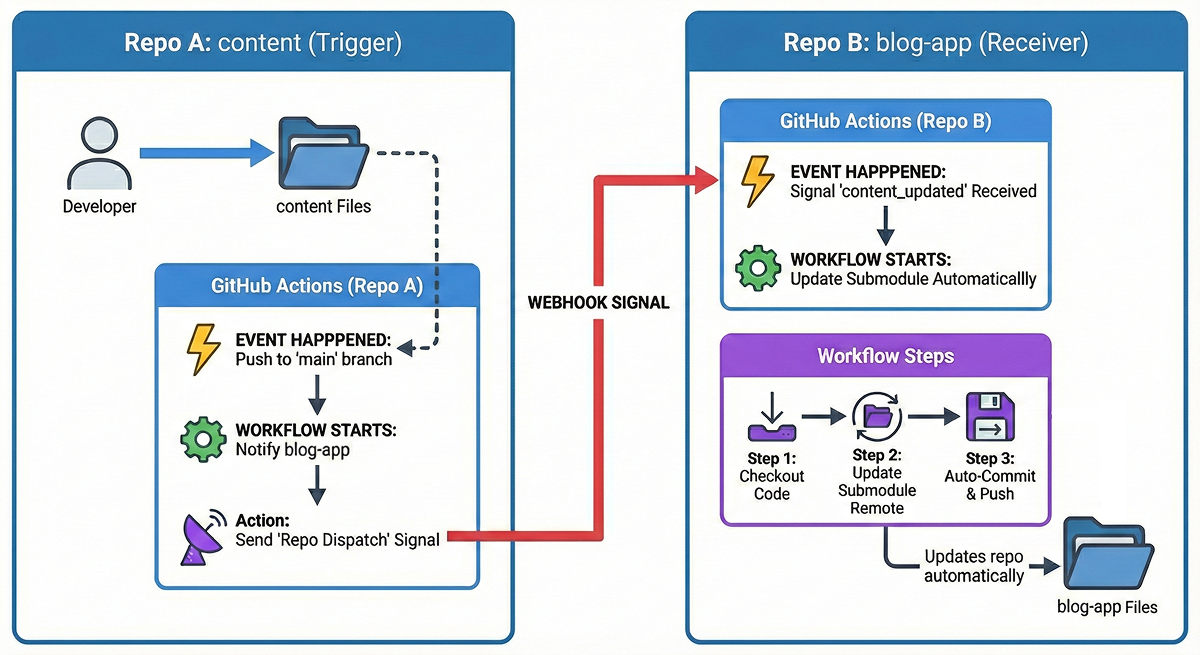
The approach is event-driven:
- Push to the content repository
- A GitHub Actions workflow sends a
repository_dispatchevent - The blog-app repository receives the event, updates the submodule, commits, and pushes
Setting Up the Personal Access Token
To allow the content repository to trigger workflows in blog-app, create a Fine-grained Personal Access Token (PAT) with these permissions:
contents: writeworkflows: write
Scope it to the blog-app repository only. Then add it as a secret named DISPATCH_TOKEN in the content repository.
How the Sync Works
From the content side, the workflow is just an API call to GitHub. From the blog-app side, it's a standard checkout with submodules followed by:
git submodule update --remote content
git commit -m "content: update submodule [skip ci]"
git push
The [skip ci] in the commit message tells GitHub Actions to skip the build for this commit. Without it, the automated commit would trigger another build, creating an infinite loop.
Gotcha: Image Paths
Images placed in content/blog/images/ will not work out of the box. Next.js only serves static files from the public directory.
The solution is to copy images to public/ at build time. Since Vercel does not support symlinks, a simple copy script works best.
Add the following to package.json:
{
  "scripts": {
    "copy-images": "mkdir -p public/images && cp -r content/*/images public/images/ 2>/dev/null || true",
    "predev": "npm run copy-images",
    "prebuild": "npm run copy-images"
  }
}
This runs automatically before dev or build, copying everything from content/*/images/ to public/images/.
Wrap Up
Git submodules have a reputation for being painful and I get why. But depending on your system and workflow, they can actually make things simpler. By isolating content from application logic, the setup became cleaner, not more complex.
This might be overkill for a small blog. But if you care about long-term maintenance or reuse, the separation pays off quickly.
If your repository is starting to feel messy, splitting content from platform is worth trying.